Every piece tracked, from kiln to customer.
The all-in-one platform built only for pottery painting studios. Automated collection tracking, online booking with deposits, and a till that lives in your browser — no more paper slips, no more mystery shelf.
No credit card required · Cancel any time
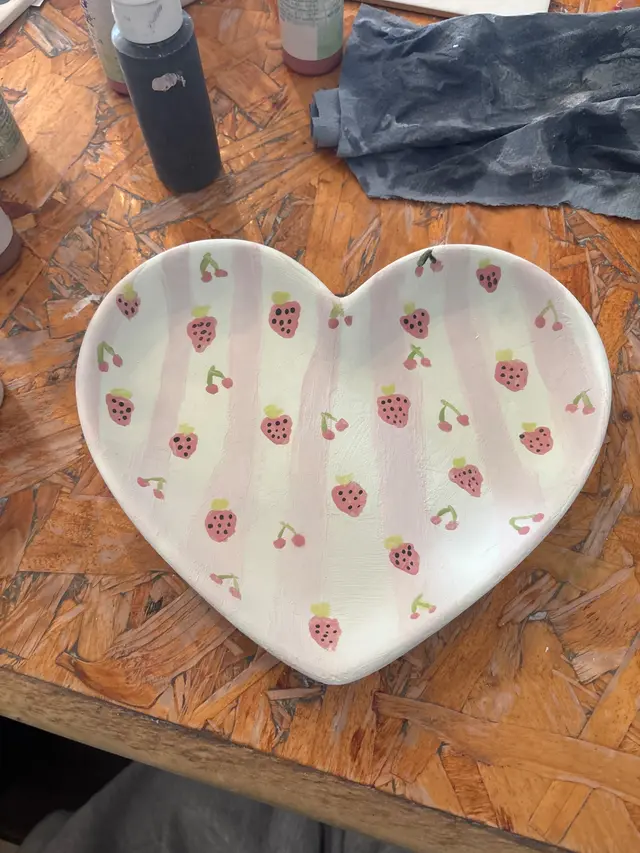
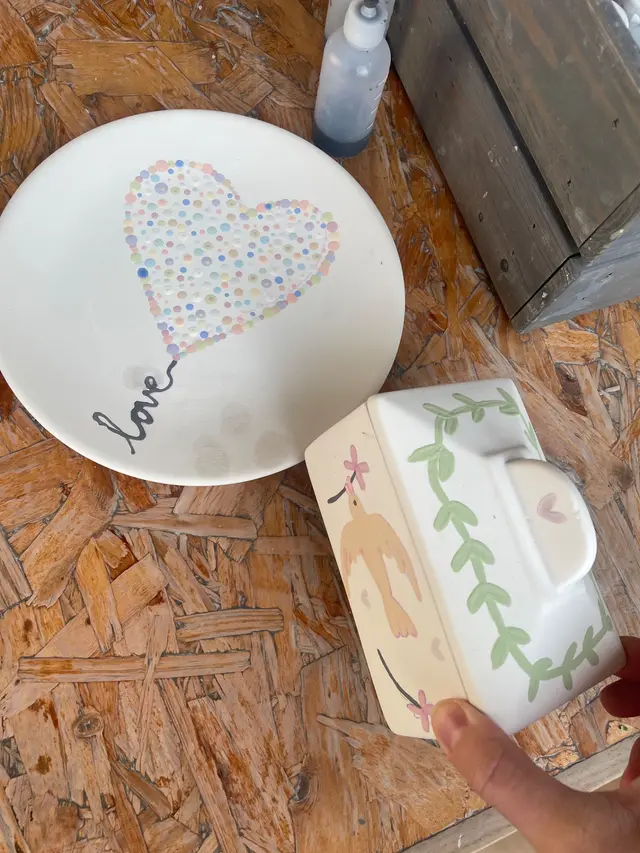
Kiln day: every customer's pieces in one gallery — one tap tells them all it's ready
Sound familiar?
Running a pottery studio is brilliant. The admin side? Less so.
You're juggling a booking system, a till, and a collection sheet — and none of them talk to each other. Every day is three apps and a spreadsheet.
No-shows on your busiest sessions because there was no deposit. Or you're using a restaurant booking platform that was never designed for a pottery studio.
Customers queuing at the counter to pay while you're trying to clear tables. No card machine, no easy way to take payment without slowing everything down.
An overdue shelf that keeps growing because chasing customers manually takes time you simply don't have.
CollectIt solves all of this — and it's probably cheaper than what you're paying today.
See your whole studio run itself
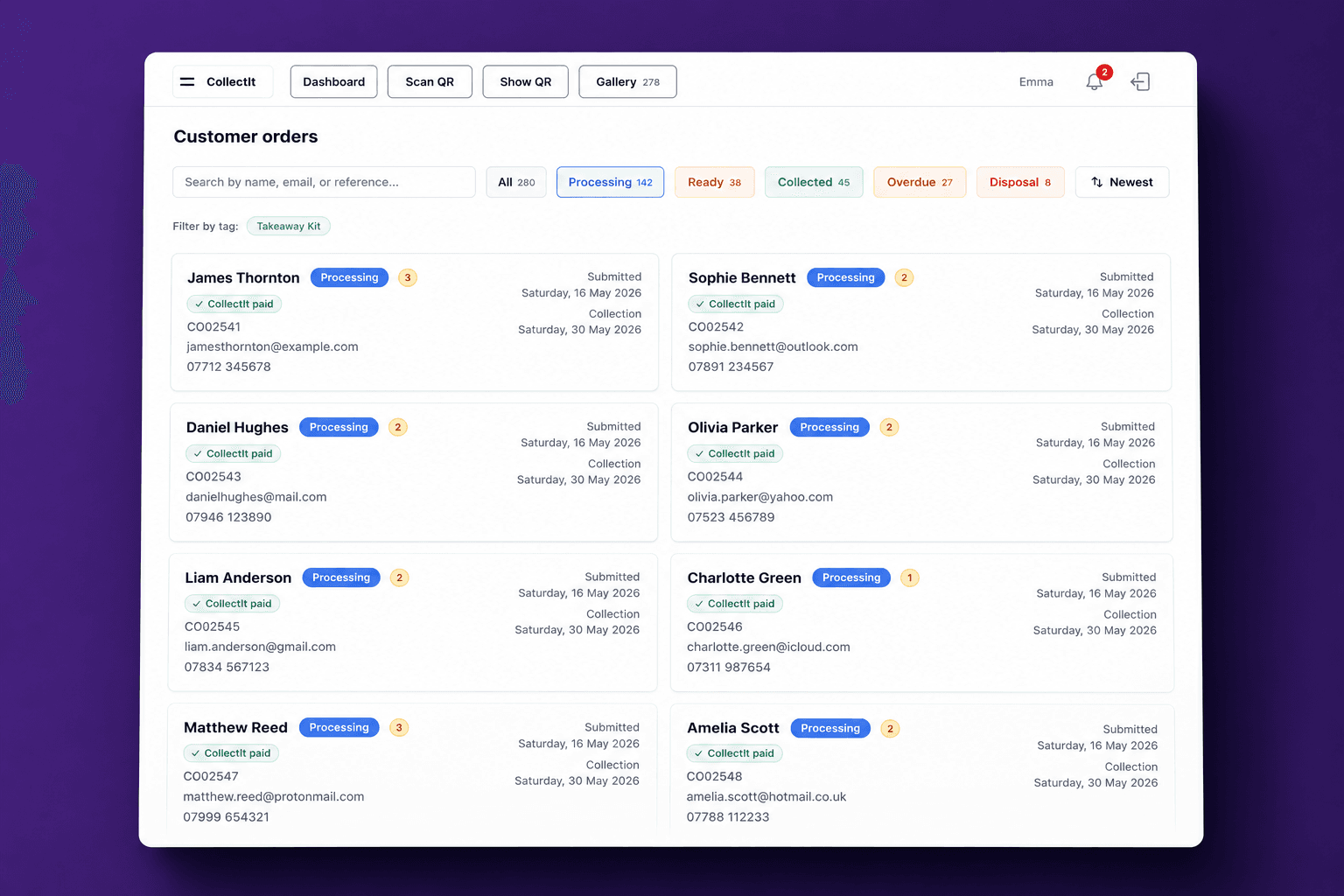
From a customer's first booking to their loyalty reward — here's the owner's-eye view, with real screenshots of the actual product.
No credit card required · Set up in under 10 minutes
One platform · Six tools built for pottery studios
CollectIt
Collection tracking — QR check-in, kiln-day gallery, fired-photo emails, overdue chasing
Explore CollectIt →BookIt
Online booking with deposits, live table planner, courses & workshops, customer records
Explore BookIt →ChargeIt
The till in your browser — pay-at-table, live inventory, gift vouchers, sales reports
Explore ChargeIt →NewShopIt
Your own online shop — sell finished pieces & gifts, Apple Pay & Klarna, postage or collection
Explore ShopIt →BetaStaffIt
Rotas, clock-in & holiday — and a free app so your team can see their shifts
Explore StaffIt →GrowIt
Loyalty cards, targeted campaigns & an AI advisor — the marketing subscription you can cancel
Explore GrowIt →The end of “whose piece
is this?”
Customers scan a QR code, fill in their own details, and photograph their pieces. On kiln day, a photo gallery shows every pending order — one tap notifies every ready customer at once. Still not collected? Reminders go out automatically.
CP0287
sarah.t@gmail.com
07812 345678
Submitted
14 Mar
Collection
21 Mar
CP0286
j.wilson@gmail.com
07923 456789
Submitted
15 Mar
Collection
22 Mar
CP0285
emma.c@hotmail.com
07734 567890
Submitted
8 Mar
Collection
15 Mar
CP0284
d.morris@gmail.com
07645 678901
Submitted
15 Mar
Collection
22 Mar
Hi Sarah, thanks for dropping off your items today! 🎨
We'll email you as soon as everything is fired and ready to collect — usually 5–7 days.
Painting day — customers check themselves in
They scan the QR code on your counter, add their details and photos of their pieces in 30 seconds. No paper slips, no deciphering handwriting, zero typing for your team.
Kiln day — match fired pieces in seconds
The gallery shows every submitted piece exactly as the customer photographed it. Click to match what's just come out of the kiln, then one tap emails everyone their fired photos.
Collection — the shelf clears itself
Customers arrive with a QR code in their inbox; one scan pulls up their pieces. Anything left too long gets chased automatically, on a schedule you control.
It grows your mailing list too — around 40% of customers tick the marketing box at check-in, syncing straight to your campaigns and Mailchimp.
QR self check-in
Customers register their own pieces
Kiln-day gallery
Match fired pieces to photos in seconds
One-tap notifications
Tell every ready customer at once
Fired photo emails
Their finished pieces, in their inbox
Overdue chasing
Email & TextIt SMS reminders run themselves
Two-way messaging
Full conversation history on every record
Marketing opt-in
~40% of customers join your list
Mailchimp sync
New contacts flow straight through
From first brush stroke to happy customer
Here's exactly what happens at every stage — for your customers and your team — with CollectIt doing the heavy lifting automatically.
Phase 1
Painting day
Customer
They spot the QR code on your counter, scan it, and a clean form opens instantly in their browser. No download, no sign-up, no friction.
Name, email address, and photos of their painted pieces — all from their phone, in under 30 seconds. No handwriting to decipher later.
Your studio
Print the QR code and stick it on the counter, display it on your shop tablet for customers to scan, or if a customer struggles with technology — just open the submission link yourself and fill it in for them. Whatever works.
The moment they submit, the entry appears. Name, pieces, photos, reference number — all there. Zero manual entry, zero paper slips to lose.
CollectIt handles this automatically
Instant branded confirmation email sent — with their reference number and photos
They know they're booked in. You didn't lift a finger.
Phase 2
Kiln day — do your thing
Your studio
Every pending job is sitting in your dashboard while you get on with the creative work. Nothing falls through the cracks.
Once your pieces come out of the kiln, open the gallery — every submitted item is displayed in chronological order, exactly as customers photographed them on painting day. Work through the pieces in front of you, clicking each photo to match it to what's just been fired. As you click, the matching customers are highlighted. When you're done, one click sends “ready to collect” emails to all of them at once.
Need to let a customer know their pieces need an extra day in the kiln? Send a message directly from their customer record. Their reply comes straight back to you, and the full conversation is stored in the record forever. The bell icon means you'll never miss a message.
CollectIt handles this automatically
Beautiful “ready to collect” email sent — with their original painting-day photos and collection QR code
They can remind themselves exactly what they painted, and have their QR code ready to show on arrival.
Phase 3
Collection — and nothing left behind
Customer
Depending on your settings, customers receive either the original “ready to collect” email or a reminder the night before — both include their painting-day photos and their unique collection QR code, so they arrive prepared.
It's right there in whichever email they received — they just pull it up on their phone. No paper ticket, no hunting for a reference number.
Your studio
One scan pulls up their customer record — reference number, name, and their original photos — so you can reunite them with exactly the right items. Hand them over, press the green collected button, and their record updates immediately.
Anything that hasn't been collected gets automatically highlighted. You can see at a glance what's been sitting too long — no more mystery shelf.
CollectIt handles this automatically
If a customer doesn't collect — automatic reminder emails go out on your schedule
You choose the frequency. CollectIt sends the chasers, flags the overdue items, and keeps your shelf clear — without you having to remember anyone.
Fill every session.
Cut no-shows to zero.
The only booking system built exclusively for pottery painting studios — not adapted from a restaurant platform. Online booking with deposits, a live table planner, courses & workshops, and takeaway boxes.
24/7 online booking
Wake up to confirmed sessions — no phone calls
Deposits that commit
Pre-paid customers don't no-show
Live table planner
Every table, every booking, at a glance
Courses & workshops
Enrolment, waitlist & fee collection
Branded booking page
Your colours and fonts, not a generic form
Customer records
Full history, notes, and two-way messaging
Takeaway box hire
Take-home kits with booking & reminder flows
Flexible session times
Drop-in windows or fixed-start workshops
AI-powered setup
Describe your studio and our AI sets up your entire booking system in seconds — session types, tables, time windows, and deposit amounts. No configuration headache.
Pick your piece and get creative — you paint it, we glaze and fire it for you!
1 hr 30 min · 2+ guests
Make a special memory of your little one
1 hr · 2–5 guests
An evening of painting with friends — BYOB!
2 hrs · 4+ guests
Your booking page, on your customer's phone — branded to your studio
Your till. No hardware,
no monthly fees.
A full studio till that lives in your browser. Photo-button catalogue, pay-at-table via Stripe, live inventory, gift vouchers, and a complete cash-up and reporting suite.
No card machine needed — unless you want one
Send a Stripe payment link straight to the customer's phone — no queuing, no hardware to rent, no paper receipts. Already have a card machine you like? Keep it: ChargeIt records payments taken on your own machine in the till and reports too.
Full pottery inventory
Photo till buttons, live stock levels, and colour-coded reorder alerts. Stock depletes automatically with every sale.
AI invoice import
Photograph a supplier invoice — ChargeIt reads it, imports every item, suggests a selling price, creates till buttons, and starts tracking stock straight away.
Gift vouchers
Sell online or in-studio, redeem at the till. Unused balance stays on the voucher automatically.
Deals & promotions
3-for-2s, percentage off, fixed discounts — applied automatically or manually. Friends & family discount? Done in one tap.
Sales reports & cash-up
Full reporting suite with profit visibility per product, 3-month forecasts, year-on-year charts, and daily cash-up summaries.
BookIt deposit deducted automatically at checkout
Your own online shop.
No Etsy fees, no website builder.
Sell your studio's work to customers at home — finished pieces, gifts and sale stock, in an online shop branded to your studio. Apple Pay, Google Pay & Klarna built in, postage or collect-in-studio per product, and every order lands in the same till and reports as the rest of your business.
Your branded shop front
Your colours, banner and story — live in minutes
Apple Pay, Google Pay & Klarna
One-tap checkout on any phone
Shipping or pickup
Ship nationwide or offer free in-studio pickup
Sale pricing & badges
Was/now pricing and product highlights
Stock that stays in sync
Counts down as you sell — online and at the till
Orders & fulfilment
Tracked from payment to the customer's hands
Included with every plan — at no extra cost today
ShopIt is currently included with your CollectIt plan while it's new. Switch it on from your dashboard and your shop can be live the same day.




Your shop, on your customer's phone — browsing from the sofa on a Sunday night
The rota, off the back of the door.
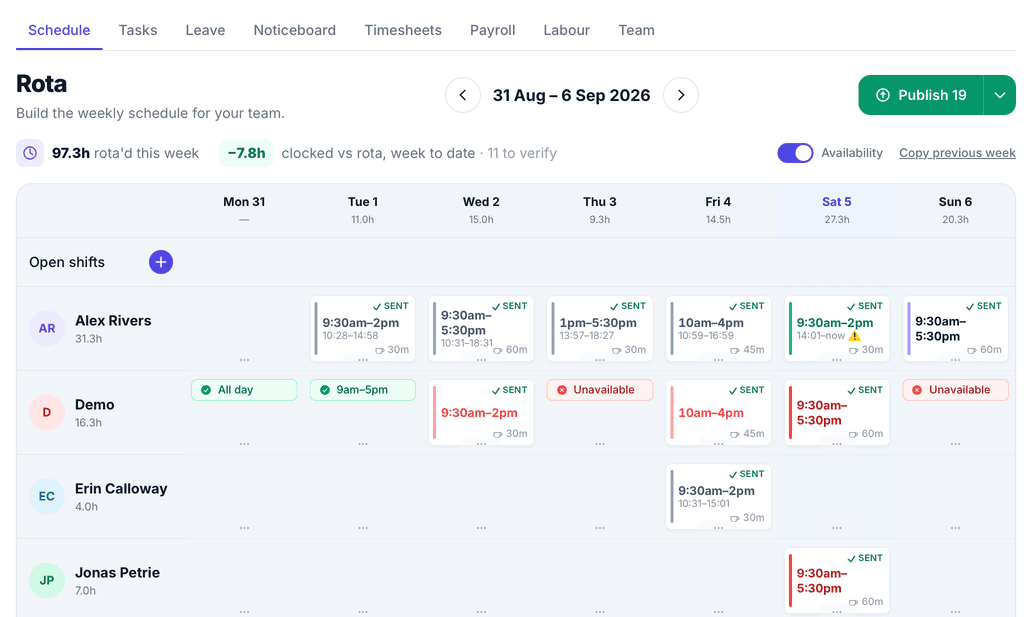
Build the week, publish it, and your team see their shifts on their own phones — instead of a photo of a printout in a group chat. They clock in and out, ask for holiday and swap shifts between themselves, and the hours land ready for payroll.
Build the week
Drag shifts onto the grid, copy last week, and see your wage cost against takings as you go.
Clock in and out
From their own phone at the start and end of a shift, with the location recorded so you know it was started at the studio.
Holiday that adds up
Requests, approvals and a running entitlement — accrued properly for irregular hours, not guessed.
Hours ready for payroll
What was scheduled, what was actually worked, and the difference — with breaks handled the way you pay them.
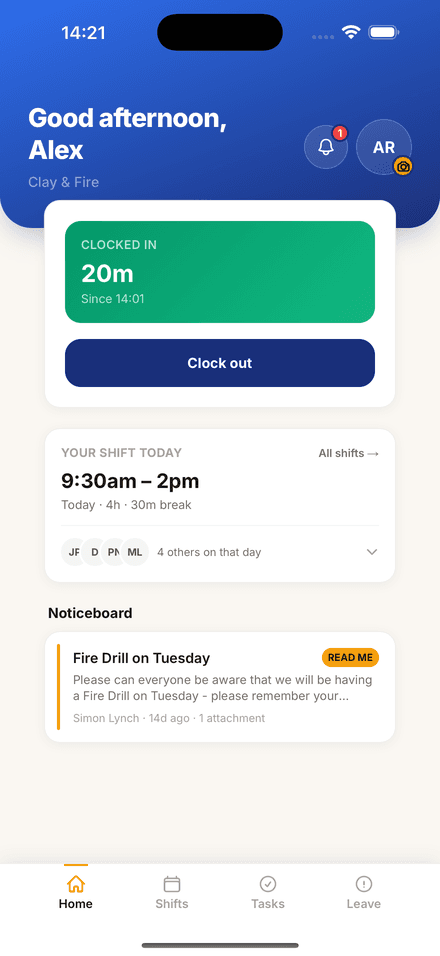
Free while it's in beta
StaffIt is included with every CollectIt plan while we finish building it, and there is a free app for your team on iPhone and iPad. It is still changing, so tell us what it is missing — that is rather the point at this stage.
Turn one-time visitors
into loyal regulars.
Digital loyalty cards, targeted campaigns, and an AI advisor that reads your own booking data. It does the job you would otherwise pay Mailchimp for — except it already knows who came in, what they made, and who has not been back since spring.
Digital loyalty cards
The moment a customer submits their check-in form, they're enrolled and receive their first stamp — no staff action needed. Walk-ins join instantly via a studio QR code. Then they add the card to Apple Wallet or Google Wallet, in your studio's colour, so it sits with their bank cards instead of getting lost in an inbox.
- Auto-enrol on booking submission
- Branded stamp card in their inbox
- Add to Apple Wallet or Google Wallet
- Walk-in QR for your counter
- Custom rewards at each threshold
- Reward expiry with auto-reminders
Hi Sarah — 3 more visits until your reward


Targeted campaigns
Send offers to the right customers at the right time — lapsed visitors, loyal regulars, birthday months. Every campaign can include a reward redeemable at your till or via a single-use QR code, and customers can keep it in Apple Wallet or Google Wallet right next to their loyalty card.
- Targeted customer segments
- Single-use QR code redemption
- Offers saved to Apple or Google Wallet
- Day, time & expiry controls
- Open & conversion tracking
- Website sign-up widget
Everyone whose last visit was 90+ days ago · 142 customers
AI Campaign Advisor
AI poweredNot sure who to target or what to offer? The Advisor reads your actual booking data and tells you where the opportunities are — and what offer will land.
- Built on your own booking data
- Segment-by-segment recommendations
- Offer and incentive suggestions
- Run it before every campaign
214 customers haven't been back since Christmas. Based on your booking data, a weekday offer converts this group best — Tuesdays are your quietest day.
This is the part that replaces the marketing subscription.
Build the email out of blocks: a heading, a paragraph, one photo or a row of them, a button, an offer. Start from one of four templates, or just write a sentence about what is going on in your week and let the AI lay the whole thing out for you, subject line included.
Preview it as a phone or a desktop, send a test to yourself, then choose who gets it. Your colours and heading font are remembered, so the next one already looks like your studio.
- Eight blocks, four templates
- AI drafts it from your week
- Everyone, a loyalty tier, or lapsed
- Your colours and fonts, remembered
- Send a test to yourself first
- Opens and clicks on every send
- Drafts save as you type
- Start again from one you have sent
Sent from a verified sending domain with SPF, DKIM and DMARC configured for you — the technical groundwork that decides whether marketing email arrives at all.
New glazes are in
Hi Sarah, six new glazes landed this week and they are already looking lovely coming out of the kiln. Here are a few pieces from the weekend.
An offer inside a newsletter, redeemed at your own till.
No extra subscription · Included in every plan · Set up in minutes
Thinking of switching,
but dreading the upheaval?
That's completely normal — and every studio on CollectIt switched from something: paper slips, spreadsheets, or another booking system. Here's how it actually works.
Start alongside what you have
Nothing gets ripped out on day one. Each module works on its own — most studios start with collection tracking next to their existing booking system, then switch the rest over when they're ready.
Bring your customers with you
Export your customer list from Mailchimp or your current system and import it yourself in a few clicks with the built-in CSV importer — or send it to us and we'll do it with you. Connect Mailchimp and your audience stays in sync from day one.
Real people help you set up
AI builds your booking setup in seconds, and if anything's unclear you email us and get a reply from the team that builds CollectIt — usually the same day. No ticket queues, no chatbots.
“Our old paper system was robust so I was nervous about changing it, but CollectIt has proven just as reliable — and then some. A few of the team were resistant to start with, but they've been completely won over by how simple it is.”
Why pay for four tools to do one job?
Most studios already spend money on a booking platform, a card solution, an email marketing subscription, and manual admin time. The CollectIt platform replaces all of it.
Without CollectIt
Online booking platform £25–40/month
And it doesn't know anything about your kiln schedule.
Card machine / till system 1.75%+ per transaction
Plus hardware costs, monthly fees, and paper receipts.
Customer tracking Your time
Spreadsheets, paper slips, sticky notes on the overdue shelf.
Email reminders Another subscription
Or hours copy-pasting emails every week.
Email marketing & loyalty $16+/month
Mailchimp for campaigns, a paper stamp card for loyalty. Neither knows who actually visited.
With CollectIt
Online booking + deposits
BookIt is included from Studio — no separate booking software needed.
Pay at the table
Customers pay on their phone via Stripe — or keep using your existing card machine. Your choice.
Full customer tracking
QR codes, photo uploads, live dashboard, and one-tap ready notifications.
Automated reminder emails
Overdue chasing runs itself. Your evenings are yours again.
GrowIt campaigns & loyalty
Digital stamp cards, targeted offers and an AI advisor — all reading your real booking data.
All of the above
From $39/month
Free for your first 50 customers · No credit card needed
What studios are saying
“We’ve started using it and it’s incredible! We take a picture of each customer’s items, fill in their details from their booking, and they get an immediate email confirming their piece is being processed. Once out of the kiln we send a fired photo and a collection notice. It’s so automated and easy — we know exactly where every piece is located. Even on a very busy Mother’s Day weekend we kept up with every customer and every pick-up. 100% recommend!”
“We've used CollectIt since March 2026 and it's had a huge impact on our business. Before, customers rarely collected on time despite hours of manual chasing — now automated email and text reminders have dramatically increased on-time collections and freed up our storage. The booking platform, courses and newsletter features all integrate seamlessly. It's one of the most valuable additions we've made, and we wouldn't want to be without it.”
“CollectIt is going down a storm with us. Our old paper system was robust so I was nervous about changing it, but CollectIt has proven just as reliable — and then some. A few of the team were resistant to start with, but they’ve been completely won over by how simple it is. It’s saved us staff time, made the whole process much smoother, and most importantly, customers have absolutely loved it. It works seamlessly!”
“We found CollectIt just two weeks before opening our craft studio, after realising the booking system we had in place wasn’t right for us — simply the best we could find at the time. Switching to CollectIt was incredibly easy, and it’s been the perfect solution not only for our pottery painting bookings, but also for our studio crafts and workshops. Simon’s support has been outstanding from day one and throughout our first weeks of trading. CollectIt has genuinely been a revelation for us, and our customers love it. We’d highly recommend it.”
Built with studios, not just for them.
CollectIt started with a real overdue shelf in a real studio — pieces nobody had come back for, paper slips that didn't match anything, and an owner spending her evenings chasing collections by hand. There was software for restaurants and software for hair salons, but nothing that understood a kiln.
So we built it alongside working studios like Kiln Time and Canny Crafty — testing every feature on real painting days, busy Mother's Day weekends included. If something didn't survive a Saturday rush, it didn't go in.
CollectIt is independent and specialist — pottery studios are all we do. That focus is why the kiln schedule, the overdue shelf, and the Saturday rush are built into the product rather than bolted on. And when you email support@collectitapp.com, you get an answer from the people who build the product — usually the same day, never a ticket queue. Your data stays yours, exportable any time, with no long contracts holding you here. We'd rather keep you by being good.
Simon
Founder, CollectIt
Your whole studio, sorted.
Try it free for your first 50 customers — no time limit. Full access to every feature, no credit card required, cancel any time.
No credit card required · Cancel any time · Set up in under 10 minutes
Simple, honest pricing
CollectIt & ChargeIt on every plan — BookIt included from Studio
Pick the plan that fits your volume. Try it free for your first 50 customers — no credit card needed.
Plans are sized by submissions — one completed check-in form. A family of five painting ten pieces on one form? Still just one submission.
Starter
Up to 200 submissions / month
≈ about 45 painting groups a week
200 campaign emails / period
CollectIt & ChargeIt for studios just getting started.
- CollectIt — QR check-in & customer tracking
- ChargeIt — browser till & sales reports
- Automated email notifications & reminders
- Overdue chasing on autopilot
- Customer photo uploads & messaging
- Unlimited staff accounts
Studio
Up to 500 submissions / month
≈ about 115 painting groups a week
500 campaign emails / period
The full platform for busy independent studios. Nearly every studio fits here.
- Everything in Starter, plus BookIt:
- Sessions, courses & workshops
- Takeaway box hire bookings
- Online deposits via Stripe
- Live table planner & scheduling
- Gift vouchers
Growth
Up to 1,000 submissions / month
≈ about 230 painting groups a week
1,000 campaign emails / period
For high-volume studios with a packed kiln every week.
- Everything in Studio — same full platform
- Double the monthly submissions
- Double the campaign emails
- Volume is the only difference
Busier still? Pro handles up to 2,500 submissions and 2,500 campaign emails a month — for the largest multi-session studios.
Not sure which plan? Start on Studio — you can change plan any time, and we'll let you know well before you reach your limit. Nothing gets cut off.
All prices exclude applicable sales tax · Free trial for your first 50 customers · No setup fees · Cancel any time
Bumper month? Top up with 100 extra submissions for $10 — unused top-ups roll over.
Campaign emails are marketing emails sent to your customers through GrowIt — loyalty reward notifications and stamp emails don't count toward this limit.
Online payments through Stripe carry a 1% CollectIt service fee in addition to Stripe's own standard processing fees, both deducted automatically. Payments taken in cash or on your own card machine carry no fees from us at all.
Questions? We've got answers.
Can I use just one part of the platform?
Absolutely. Most studios start with collection tracking to sort out their kiln-to-collection workflow, then switch on BookIt and ChargeIt when they're ready. Each module is independent — use what you need, add the rest when it makes sense.
I already use another booking system — how do I switch?
Gently — and with us alongside you. Start with collection tracking next to your existing tools; it doesn't touch your bookings at all. Your customer list comes across with a simple CSV import: export it from your old system, and we'll guide you through the process step by step (or just do the import for you) so nothing gets lost. Then honour the bookings already in your old system while taking new ones through BookIt — most studios run both for a week or two and then switch off the old one. Nothing has to change overnight, we'll support you through every step, and the free trial is a safe place to test the whole thing — it lasts until your first 50 customers, so there's no clock ticking while you switch.
Can I bring my existing customer list with me?
Yes — in minutes. Export your customers from Mailchimp or your current booking system as a CSV and import them yourself with the built-in importer (Settings → Mailing list): it matches your columns, previews everything, and skips duplicates automatically. Prefer a hand? Send us the file and we'll do it with you. And if you use Mailchimp, connect your account and CollectIt keeps your Mailchimp audience up to date automatically as new customers check in.
Is my data locked in?
No — your data is yours. You can export your customers, bookings and sales as CSV at any time, and if you ever leave we'll hand over everything and delete your data on request, in line with GDPR.
Do I need a card machine?
No — but you can absolutely keep yours. ChargeIt works both ways: send a Stripe payment link to your customer's phone so they pay at the table (no hardware, no rental fees, no paper receipts), or ring up the sale and take payment on your existing card machine, with ChargeIt recording it in your till and reports. You can also take cash, sell and redeem gift vouchers, or save a balance to settle later.
Does BookIt handle courses and workshops as well as regular sessions?
Yes — BookIt has a dedicated Courses & Workshops section for multi-session bookings. Customers can enrol on a full course, pay online, and join a waiting list automatically if it's full. You can set a per-session price for late joiners too. It works alongside your regular drop-in and fixed-time bookings.
How does BookIt reduce no-shows?
By taking a deposit at the time of booking. Customers who've paid something upfront are far more likely to show up — or cancel in advance if they can't. You set the deposit amount per session type. Automated reminder emails go out before each session too.
Can I brand my booking page with my studio's colours?
Yes — your public booking page is fully branded. Set your accent colour, font, hero image, and logo in BookIt settings and it all comes through on the customer-facing page. It looks like your studio, not a generic booking form.
Can CollectIt handle my staff rotas?
Yes — StaffIt covers the rota, clock-in, holiday and the hours that go to payroll. You build the week, publish it, and your team see their own shifts on their phones through a free StaffIt app, rather than a photo of a printout in a group chat. They clock in and out, request holiday against a running entitlement, and swap shifts between themselves for you to approve. StaffIt is still in beta and is included with every CollectIt plan while we finish building it.
Can I sell my pottery online through CollectIt?
Yes — ShopIt gives your studio its own online shop, branded with your colours and banner, at your own CollectIt link. Sell finished pieces, gifts and sale stock with Apple Pay, Google Pay and Klarna built in, offer postage or free collect-in-studio per product, and every order flows into the same till and sales reports as the rest of your business. ShopIt is currently included with every CollectIt plan at no extra cost.
How does ChargeIt manage stock and inventory?
ChargeIt keeps a live inventory of every product. Stock depletes automatically with each sale and colour-coded alerts flag low stock before you run out. The AI invoice import feature lets you photograph a supplier invoice — ChargeIt reads it, imports every item, suggests a selling price, creates till buttons, and starts tracking stock straight away.
What happens to items that aren't collected?
CollectIt flags overdue pieces on your dashboard and automatically sends reminder emails on a schedule you control — how often, how many times, and what they say. Add TextIt and the reminders go by SMS too — text messages get read far more reliably than email, and studios using them have seen uncollected items fall dramatically (from just 5p per message). You can also send a one-off custom message at any point.
Does it work on mobile?
Yes — every part of the platform is mobile-first. The staff dashboard, table planner, QR scanner, ChargeIt till, and all customer-facing forms work perfectly on any phone or tablet. No app download needed.
What does it cost after the free trial?
Plans start at $19/month for CollectIt and ChargeIt. BookIt is included from Studio at $39/month. The only additional cost is on online payments: a 1% CollectIt service fee on top of Stripe's standard processing fees. Cash and payments on your own card machine cost nothing extra. No setup fees, no extras to unlock.